Skin Care Scanner: GlowUp
- 4.7
- Rating
- 10.00K
- Installs
- Free
- Price

 Analysis by App-foxy
I approached Skin Care Scanner: GlowUp as a practical beauty companion rather than a replacement for a dermatologist. That distinction matters. The app is built around the idea of using a phone-based skin scan and a guided skincare routine to make daily care feel more organized. In my experience, its biggest value is not promising a perfect diagnosis; it is helping turn vague concerns into a repeatable routine that is easier to follow.
GlowUp comes from BroxApp Studio and is available as a free beauty app for Android users. It is aimed at everyday skincare rather than professional clinical work, and its Everyone age rating makes it approachable for a broad audience. The app has reached over 10 thousand installs and holds a 4.7 average from around 386 ratings, which suggests that its simple approach is connecting with people who want a convenient starting point.
What the scanner and routine approach actually offer
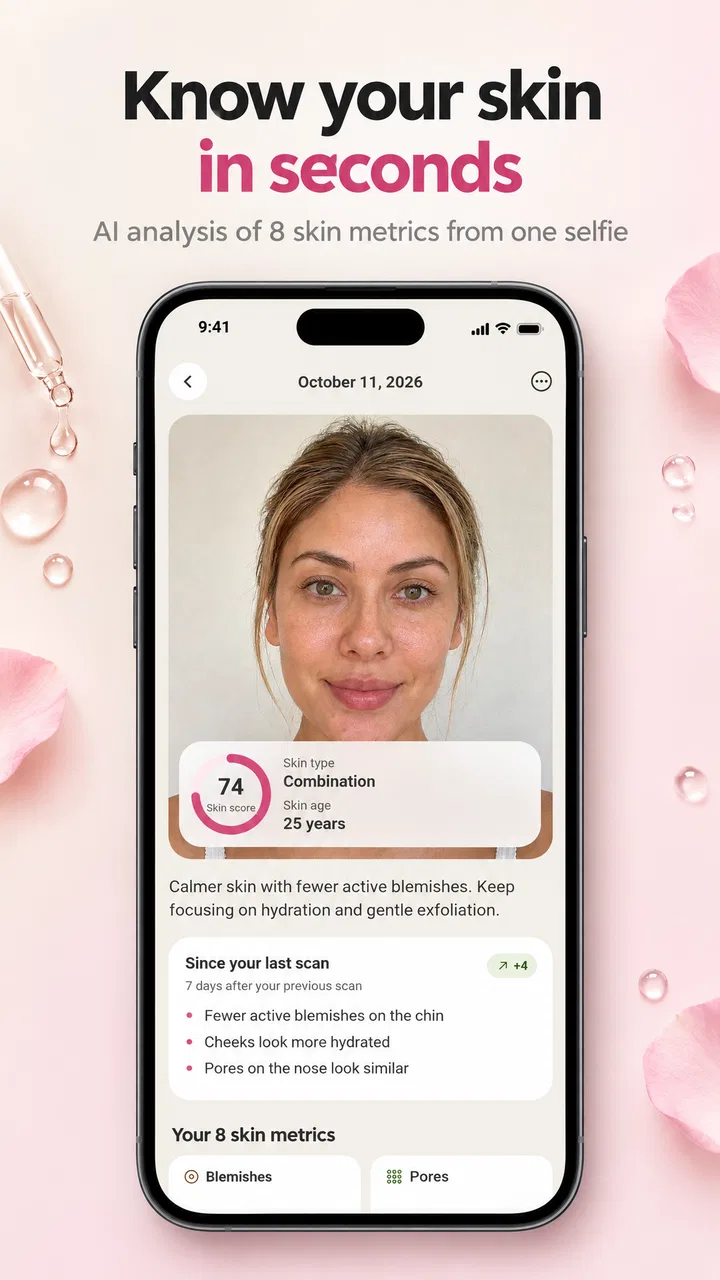
The central appeal is the combination of a skin scanner and a skincare assistant. Instead of opening a general beauty article and trying to decide what applies to you, you can begin with the app’s scan-oriented workflow and use the result as a starting point for personal care. That feels more useful than a completely generic checklist, especially if you are unsure whether your main concern is dryness, uneven appearance, blemishes, or simply a lack of consistency.
You May Also Like

 AccuWeather: Weather Radar
AccuWeather Review: A Quick, Clear Forecast for Everyday Decisions
For everyday plans, the best forecast is the one you can understand quickly. AccuWeather makes rain timing, radar, and local conditions easy to act on, with a few trade-offs.

 Hill Climb Racing
Why Hill Climb Racing Still Turns Crashes Into One More Run
A tiny car, a bumpy hill and one more upgrade: Hill Climb Racing keeps resurfacing because its simple chaos makes every near-miss feel personal.

 AliExpress - Shopping App
AliExpress Makes Global Shopping Feel Personal, but Shoppers Bear the Risk
AliExpress turns a global marketplace into a pocket-sized discovery engine. Its reach is useful, its shopping loop compelling, and its trade-offs easy to miss.

 Lords Mobile: Kingdom Wars
Lords Mobile Is a Kingdom-Building Routine, Not a Quick Match
A case-by-case verdict on the building, battles, device demands, and social commitments that make Lords Mobile rewarding for some players and exhausting for others.

 PDF Scanner app - TapScanner
TapScanner Makes Paperwork Easier to Capture, Check, and Share
TapScanner makes scanning with a phone feel less like a rescue operation and more like a dependable step in getting work done. Its capture tools are useful, though not flawless.

 Block Blast!
 Shows How Much a Puzzle Game Can Leave Out
A quiet grid game shows why puzzle players increasingly value instant clarity, repeatable skill and low-pressure play—and where the genre still needs to catch up.
More From Our News Desk
View All News


I found the scan concept most helpful when treated as a comparison tool rather than an authority. A phone camera can be affected by lighting, angle, camera quality, makeup, and the distance between your face and the screen. Because of that, I would use GlowUp under similar conditions each time: clean skin, steady lighting, and a similar position. This creates a more sensible personal reference than scanning randomly in different rooms and assuming every change reflects your skin.
That is one of the app’s less obvious strengths. The real benefit of a scanner is not necessarily the first result. It is the possibility of making your routine more deliberate. If you scan before changing several products, then scan again after a reasonable period, you have a clearer way to think about whether your habits are helping. I would still judge progress by comfort, visible changes, and how my skin feels, but the app can provide structure around that process.
The routine side is equally important. Many people do not struggle because they have never heard of cleanser or moisturizer. They struggle because they buy products without a plan, use them in an inconsistent order, or change everything at once. A skincare assistant can reduce that confusion by giving the routine a central place. For someone who repeatedly forgets what they intended to use, that organization may be more valuable than another product recommendation.
GlowUp is also a good fit for a short daily check-in. I can imagine using it in the morning before leaving for work or in the evening after washing my face. The useful habit is not spending a long time analyzing every image. It is taking a moment to notice what I am doing, follow a manageable sequence, and avoid impulsively adding another product because of one bad skin day.
A realistic everyday workflow
Imagine someone who has a busy week, a few products on the bathroom shelf, and no reliable routine. On Sunday evening, that person could use the scanner as a baseline, note the skin concern that feels most relevant, and set up a simple routine rather than trying every product at once. During the week, the assistant can serve as a reminder of the intended steps. At the end of the week, the user can reflect on whether the routine was comfortable and realistic.
The important trade-off is restraint. If a scan makes you focus on every small imperfection, the app could encourage overthinking. I would not respond to one result by buying several new treatments. A better workflow is to change one element at a time, keep the rest of the routine stable, and stop anything that causes persistent discomfort. GlowUp is most useful when it supports calm observation instead of turning skincare into constant troubleshooting.
This approach also makes the app more accessible to beginners. A newcomer does not need to understand every ingredient category before opening it. The scanner gives the experience a clear entry point, while the routine concept gives the user something practical to do afterward. That is easier to act on than a long article filled with technical terms and no personal structure.
Where GlowUp feels stronger than ordinary alternatives
The usual alternative is a mixture of web searches, social media advice, notes on a phone, and memory. That combination can provide plenty of information, but it often lacks continuity. One video may recommend a strong active ingredient, another may suggest a completely different routine, and neither knows what you already use. GlowUp’s advantage is that it places the scan, guidance, and routine idea in one focused beauty experience.
It also feels less intimidating than professional skincare software. A clinic-oriented tool may be better when you need medical assessment, detailed records, or treatment decisions, but it can be excessive for someone who simply wants to establish basic habits. GlowUp occupies a more approachable middle ground: more directed than a blank notes app, but less clinical than a service intended for professional consultation.
That does not make it superior in every situation. A knowledgeable skincare enthusiast may prefer a detailed ingredient tracker, a product database, or a manual journal that allows precise notes about formulas and reactions. If your main goal is comparing ingredients or recording a complex treatment plan, GlowUp’s scan-and-routine focus may feel too narrow. Its strength is simplicity, and simplicity naturally means fewer layers of control.
I also would not use it as the only source of advice for a serious or persistent skin problem. A scanner can help you notice patterns, but it should not be treated as a medical diagnosis. Pain, rapidly changing marks, severe irritation, or a problem that does not improve deserves attention from a qualified professional. The app can support everyday awareness; it cannot replace clinical judgment.
The meaningful limitations to consider
The first limitation is the reliability of camera-based interpretation. Even if the app gives a useful-looking result, the image itself is not a controlled examination. Indoor lighting can make redness appear stronger, shadows can emphasize texture, and a camera may interpret temporary changes as a more lasting concern. I would therefore avoid making expensive or aggressive skincare decisions from a single scan.
The second limitation is the risk of routine overload. A guided assistant sounds convenient, but skincare works best when the routine remains realistic. If the suggested path feels too long, users may follow it for a few days and then abandon it. My advice is to treat the app as a planning aid and keep only the steps you can consistently maintain. A shorter routine that you actually follow is more useful than an ambitious one that stays on the screen.
There is also a financial detail worth noticing. The app itself is free, but in-app purchases range from $9.99 to $39.99 per item. That does not automatically make the paid options poor value, yet it means I would explore the free experience first and understand what is included before committing. Anyone downloading it should be comfortable making a deliberate decision rather than assuming every part of the experience costs nothing simply because the initial download is free.
The current version is 1.0.1, so I would approach it as a relatively early product rather than a mature platform with a long history. That is not a criticism by itself, but it does shape my expectations. Early releases can have a clean, focused idea while still needing refinement in areas such as workflow depth, scan consistency, or the range of personalization. I would judge the app by whether its core routine helps me, not by expecting it to cover every skincare need.
Another practical issue is emotional. Skin apps can be motivating, but they can also make users inspect their faces too often. If you already tend to magnify minor imperfections, daily scanning may not be the healthiest habit. In that case, a simple routine reminder without frequent analysis could be a better choice. GlowUp works best for users who can view the scan as information, not as a verdict on their appearance.
Who will get the most from the app
I would recommend GlowUp most strongly to beginners, inconsistent routine-builders, and people who want a more personal starting point than a generic beauty article. It is especially suitable if you own a few skincare products but lack a clear order or schedule. The app’s combination of scanning and guidance gives those users a reason to pause, organize their habits, and make gradual changes.
It may also suit someone returning to skincare after giving up on an overly complicated routine. Rather than rebuilding a ten-step system, I would use the app to identify the main concern, establish a small number of repeatable actions, and observe how that feels over time. The less-is-more approach is important here. The app should help reduce confusion, not create a new source of pressure.
Users who enjoy visual progress may appreciate having a scan-based reference. The best way to use that feature is to keep the process consistent and leave enough time between meaningful comparisons. Taking multiple scans in a single day is unlikely to offer useful perspective. A stable routine and patient observation will tell you more than constant checking.
I would be more cautious about recommending it to advanced users who already understand their skin and keep detailed ingredient records. They may find greater value in a specialized tracker that lets them log exact products, concentrations, reactions, and dates. GlowUp is not the obvious choice for someone seeking laboratory-style analysis or a comprehensive professional record.
It is also not the right choice for anyone expecting a diagnosis or guaranteed results. The app can make skincare feel more manageable, but it cannot remove the uncertainty that comes with personal care. Skin changes for many reasons, and no phone-based assistant can account perfectly for every one of them. That expectation should be clear before downloading.
How I would use it without wasting money or attention
I would start with the free version and spend enough time understanding the basic scan and routine flow before considering any purchase. Since individual in-app items can cost between $9.99 and $39.99, I would only pay for something that solves a specific problem in my routine. A vague promise of “more” would not be enough for me; I would want a clear reason that matches my needs.
I would also prepare for the scan instead of treating it like a casual selfie. Clean skin, even lighting, and a consistent angle make the comparison more meaningful. I would avoid scanning immediately after exercise, a hot shower, or applying a new product, because temporary changes could make the result harder to interpret. This is a simple habit, but it is one of the most useful ways to get better value from the app.
My routine would begin conservatively. I would keep familiar products in place, use the assistant to organize them, and introduce only one change at a time. If something feels irritating, I would stop and reassess rather than assuming the app’s guidance must be correct. This workflow protects the user from a common skincare mistake: confusing a busy routine with an effective one.
I would treat the app’s observations as prompts for questions. Does my skin feel comfortable? Is the concern persistent? Did a change make a noticeable difference? Am I following the routine consistently? Those questions turn GlowUp from a novelty scanner into a useful personal-care tool. They also prevent the technology from taking over decisions that should remain grounded in common sense.
My verdict after weighing the convenience against the limits
Skin Care Scanner: GlowUp has a clear and appealing purpose: make skincare feel more personal and easier to organize. Its strongest contribution is the bridge between noticing a concern and building a routine around it. For a beginner, that bridge can be genuinely helpful. The app is free to start, has an approachable beauty focus, and comes from BroxApp Studio in a compact current release.
Still, I would keep my expectations realistic. The scanner is not a clinical examination, and the routine assistant should not encourage constant checking or unnecessary purchases. The paid items also make it sensible to test the free experience carefully before spending. These are not reasons to dismiss the app; they are reasons to use it thoughtfully.
My recommendation is specific: choose GlowUp if you want a guided entry into everyday skincare, need help creating consistency, and are willing to judge progress patiently. Skip it if you want medical diagnosis, highly technical ingredient tracking, or complete control over a complex regimen. For the right user, its real strength is turning scattered skincare intentions into a routine you can actually repeat. That is a modest promise, but in daily life, it is often the part that matters most.
FAQs for Skin Care Scanner: GlowUp
01What features does Skin Care Scanner: GlowUp offer?
Skin Care Scanner: GlowUp provides a comprehensive suite of features designed to enhance your skincare routine. It includes AI-powered skin analysis, personalized skincare recommendations, progress tracking, and a database of skincare products. The app also offers educational content to help users understand their skin type and needs better.
02Is Skin Care Scanner: GlowUp suitable for all skin types?
Yes, Skin Care Scanner: GlowUp is designed to cater to all skin types. The app uses advanced AI technology to assess individual skin characteristics and provide personalized recommendations. Whether you have oily, dry, combination, or sensitive skin, GlowUp tailors its guidance to meet your specific needs.
03How accurate is the skin analysis feature in Skin Care Scanner: GlowUp?
The skin analysis feature in GlowUp utilizes advanced AI algorithms to deliver accurate assessments. While it provides reliable insights based on uploaded images, it should complement, not replace, professional dermatological advice. Users can expect detailed analysis on various skin concerns, including acne, wrinkles, and hydration levels.
04Are there any in-app purchases or subscription fees?
Skin Care Scanner: GlowUp offers both free and premium versions. The free version includes basic features, while the premium version unlocks advanced tools and personalized recommendations. Users can opt for a monthly or annual subscription to access the full suite of features, ensuring a comprehensive skincare experience.
05How does Skin Care Scanner: GlowUp ensure user data privacy?
GlowUp prioritizes user privacy by implementing robust data protection measures. The app complies with industry-standard security protocols, ensuring that all personal information and images are securely stored. Users have full control over their data, with the option to delete their information at any time.
Pros
- Accurate skin analysis with detailed insights.
- Easy-to-use interface with intuitive navigation.
- Personalized skincare routine suggestions.
- Tracks skin progress with visual updates.
- Includes reminders for skincare routines.
Cons
- Limited free features; subscription required.
- Requires consistent internet connection.
- Some users report slow scanning process.
- Occasional ads in the free version.
- Limited product recommendations for diverse skin types.

Skin Care Scanner: GlowUp
Gallery